APP
Sidecar
Complications on demand.
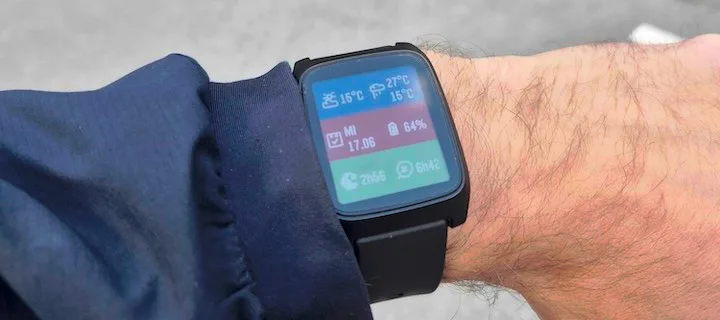
Your watchface looks great — but it probably does not show everything you care about. Sidecar is a quick-launch companion watchapp that fills the gaps: a configurable grid of complications you can open in one press and dismiss just as fast.
FEATURES
What it does
- Up to six configurable complication slots
- Quick Launch access on Pebble Time 2
- Weather & forecast from your phone
- Steps, distance, heart rate & sleep
- Custom colors, fonts & per-cell styling
Keep your watchface minimal
Love a minimal face with no clutter? Keep it. When you need steps, sleep, weather, or battery at a glance, Sidecar is there.
Assign any complication to up to six grid slots: current weather, weather forecast, steps, distance, heart rate, battery, date, sleep total, or deep sleep. Leave a slot set to None and it simply is not drawn — the grid layout adapts automatically based on how many slots you use, from a single full-screen cell up to a 2x3 grid.
SCREENSHOTS
On the watch
Pebble Time 2
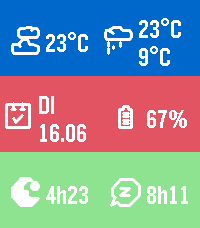
Six slots on Pebble Time 2
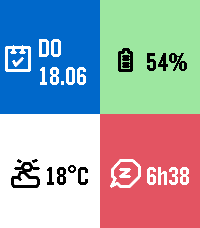
Four slots — the grid adapts to how many you use
Pebble Round 2
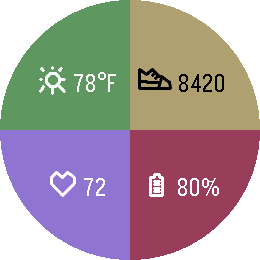
Four quadrants on the round screen
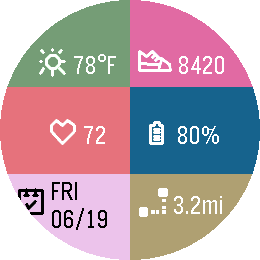
Six cells on the round screen
SETUP
Put it one button press away
Sidecar is built for Quick Launch — assign it to a button and it opens straight from your watchface.
- Open the Pebble app on your phoneGo to Settings, then Quick Launch.
- Pick a buttonAssign Sidecar to a Quick Launch button on your Pebble Time 2.
- Long-press to openHold that button from your watchface and Sidecar appears.
- Press Back, Up or Down to exitAny of the three dismisses Sidecar and returns you to your watchface.
CONFIGURATION
Settings
Open Sidecar in the Pebble app on your phone to change:
- ComplicationsAssign current weather, forecast, steps, distance, heart rate, battery, date, sleep total or deep sleep to each of the six slots.
- UnitsCelsius or Fahrenheit. Weather uses your phone’s location via Open-Meteo.
- ColorsGlobal background and foreground colors, or per-cell colors for a bolder look.
- FontGothic, Roboto Condensed, Droid Serif, Bitham and more — or leave it on Auto to scale with your grid size.
COMPATIBILITY
Where it runs
- Watches
- Pebble Time 2Pebble Round 2
- Uses
- Settings on your phonePebble Health data
- Version
- 1.2
- Category
- Daily
Free on the Pebble Appstore. No account, no tracking.
Get Sidecar
A quick-launch Pebble watchapp with a configurable grid of complications — weather, steps, heart rate, sleep and battery — one press away.
ALSO BY FLWKT
More for your Pebble
WATCHFACE
Retro Dot
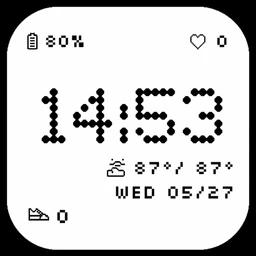
A dot-matrix Pebble watchface with the time in bold pixels and battery, date, heart rate, weather and activity at a glance.
- Pebble 2 / 2 Duo
- Pebble Time 2
- Pebble Round 2

APP
Return to
An ICE-style contact card for your Pebble — your name, address, phone and email on screen, so whoever finds your watch knows how to reach you.
- Pebble Time 2
- Pebble Round 2